Online whiteboard: Doshka vs Miro, FigJam, Excalidraw and draw.io, chosen by who draws and what they hold in their hand
Disclosure: Doshka is built by the Osvitanok project, a sub-brand of City Profit. Competitor prices come from public pricing pages and price trackers in November 2026, and they change often, so check the vendor page before you buy.
Short answer. Pick an online whiteboard by two facts: how many people draw at once and what they hold in their hand. Miro and FigJam win a live workshop. Excalidraw and draw.io win when the price must be zero. Doshka wins when one author draws diagrams with a pen or a finger and wants a quiet canvas, at 1,188 UAH a year after 30 free days.
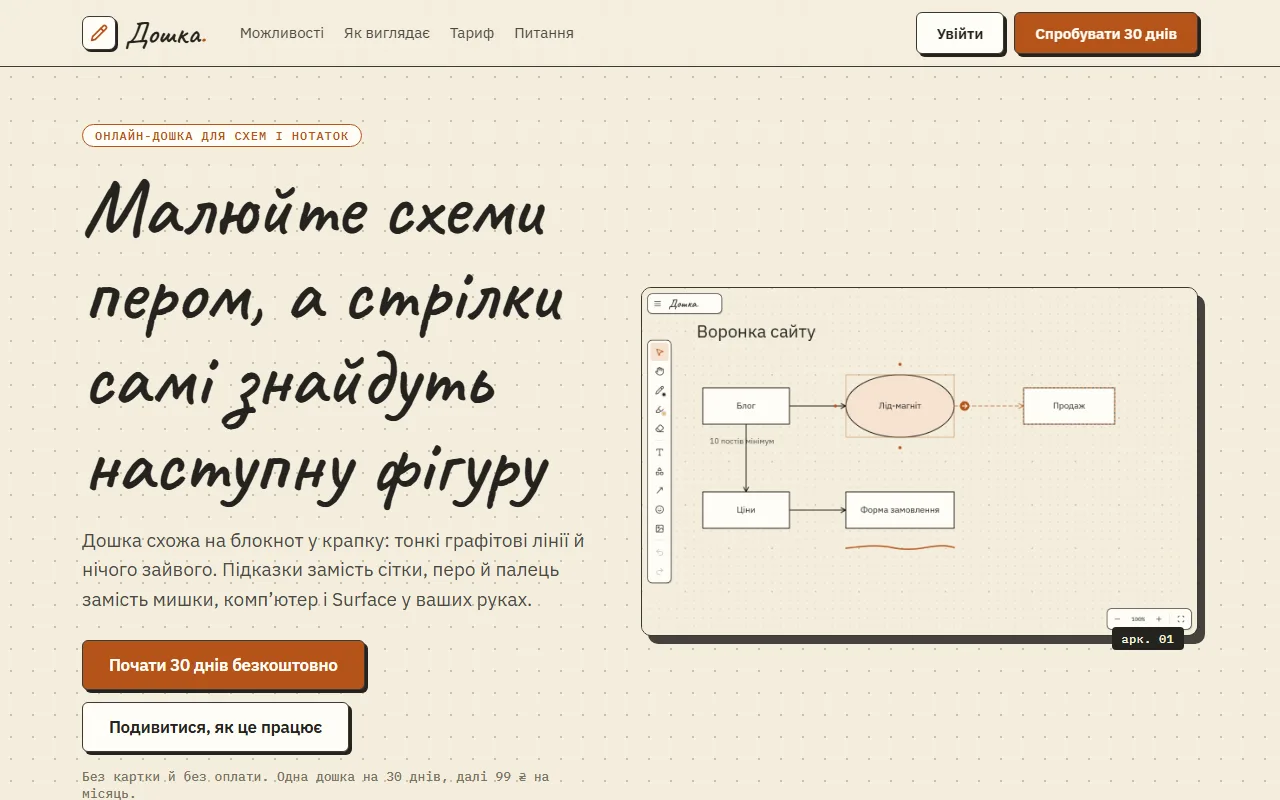
The Doshka start page, a real screenshot from doshka.osvitanok.com.
Five questions, one board
Answer honestly, including the answers that rule Doshka out. The picker adds weights, no hidden scoring: the tools at the top fit your answers best.
DoshkaA quiet board for one author: diagrams and notes, pen and touch, 10,000+ icons. 30 days free, then 1,188 UAH a year. No sharing, no comments, no templates.
MiroThe workshop wall: live cursors, templates, sticky notes, AI. Starter is about $8 per member per month on annual billing.
FigJamCheap collaboration if your team already lives in Figma. Price lists show about $3 per collaborator seat per month on Professional.
ExcalidrawHand-drawn sketches in the browser, free and without an account. Excalidraw Plus is about $7 per user per month.
draw.ioFree, precise technical diagrams in the browser or as a desktop app. Built for exactness, with templates but no workshop features.
What Doshka leaves out on purpose
0AI buttons
0templates
0sticky notes
0comments
0timers
0reactions
Every item on that list is a feature a workshop tool sells. Remove them and a lesson diagram, a process map or a family tree opens fast and stays calm. The price of that calm is real: no one else can draw on your board.
Pen, eraser, palm, finger
Pen pressure, the eraser end of the pen and palm rejection work on Surface and tablets. A finger moves and zooms the board.
Arrow dots on every shape
Hover a shape and dots appear on its sides. Hover a dot and Doshka previews the arrow to the nearest shape in that direction. One click and the link is drawn.
What a year costs per person
Doshka sells one account per author, so the comparison counts every person who draws. Free tools show a zero bar.
Doshka is 1,188 UAH a year per person, shown at 42 UAH per dollar, so check the current rate. FigJam is $3, Excalidraw Plus about $7 and Miro Starter $8 per person per month on annual billing, according to price trackers in November 2026.
When a workshop wall is the right call
A team workshop is where Miro and FigJam earn their price.
If six people must move sticky notes at the same minute, Doshka is the wrong tool and we say so. Pick Miro for templates and facilitation features, or FigJam when design already sits in Figma.
How to decide in ten minutes
Draw one real diagramUse a lesson, a process or a family tree you actually need this week.
Count the people who editOne author points to Doshka, Excalidraw or draw.io. Several authors point to Miro or FigJam.
Export itRight-click saves a PNG in Doshka, even with a transparent background. Check the same step in the others.
Add the neighboursThe same account opens ProstoSlider for the slides and ScreenCaster for the recording, and all three Pro plans together cost 20% less.
No. A Doshka board belongs to one author, and there are no share links or comments today. For a live workshop with many cursors choose Miro or FigJam.
What happens after the 30-day trial?
The board stays available to view and download as PNG. To keep editing, the Doshka plan costs 99 UAH a month, billed 1,188 UAH a year in advance, and allows up to 10 boards.
Does Doshka work with a pen?
Yes. It supports pen pressure, the eraser end of the pen, palm rejection and touch. Hold the pen at the end of a line and it straightens, and a rough circle or rectangle becomes a clean one.
Why do I get a code by email when I sign in?
The code protects the account without an extra app. One account also opens ScreenCaster and ProstoSlider.
A five-question picker, a yearly cost slider and a list of what Doshka leaves out on purpose: AI buttons, templates, stickers, comments, timers and reactions.
The funnel as the world draws it, the same funnel on a real pitch slide, a live funnel you can move and the Motivations tab that gives every number an…